The Veeam Community Weekly Recap is available with incredible content and relevant information! Congratulations to Nico Losschaert, Brad Linch, Christian Eromosele, and Philippe Dupuis for the posts and articles.
Thanks so much to Madalina Cristil, Mark Boothman, and Safiya Mohamed for the opportunity to participate! I am honored.
Again, Veeam has exceeded expectations and delivered a new release for the Veeam Data Platform with many new features and integrations.
This release expands Veeam Backup and Replication platform capabilities significantly. This post will focus on Proxmox VE compatibility, MongoDB support, Nutanix Prism Central integration, and Microsoft Azure Cosmos DB support.
The VDP 12.2 for VBR release also delivers other new workload integrations, enabling customers to transition to new platforms with confidence and security, like:
IBM Db2: Linux on Power support and SLES 15 SP5 support.
SAP HANA plugin: now operates on RHEL 9.4 for SAP HANA.
Veeam Agent for Linux: support for the latest Linux distribution versions like SLES 15 SP6 (for x86_64), Debian 12.4, and Fedora 40.
VMware Cloud Director 10.6 support and vSphere 8.0 Update 3 support.
Amazon Redshift Cluster and Amazon FSx protection.
Microsoft Azure Data Lake Storage Gen2 protection.
The new release brings many other new features and improvements.
I can highlight the latest “Direct to Archive” Scale-out Backup Repository capability. Now, it is possible to offload aging backups directly from the Performance Tier to the Archive Tier without requiring offloaded backups to land on the Capacity Tier first.
I would also like to emphasize the addition of immutable snapshots for HPE storage arrays. HPE 3PAR, Primera, Alletra, and Alletra MP storage users now have an enhanced immutability option. With version 12.2, HPE’s native Virtual Lock functionality can make storage snapshots immutable, providing an extra layer of security against data tampering and ransomware by creating read-only snapshots.
Another key highlight is optimizing API integration with Object Storage repositories (SOSAPI?). The new version significantly reduces the load on object storage by cutting the frequency of specific API calls by up to 10 times. This decrease in API calls can help lower costs with cloud object storage providers who charge based on API usage.
Proxmox Virtual Environment
Native support for host-based backups of Proxmox VE virtual machines (VMs) offers users enhanced flexibility to meet evolving virtualization and cloud requirements.
Key highlights of Veeam’s Proxmox VE integration include:
Immutable backup support: ensures that both on-premises and cloud backups of Proxmox VE VMs remain secure from ransomware encryption, accidental deletions, or malicious tampering during cyberattacks through storage-based immutability.
Enhanced backup performance: with advanced changed block tracking (CBT) integration and HotAdd backup mode, Proxmox VE users can benefit from rapid and efficient VM backups (including powered-off VM), reducing the impact of lengthy backups and ensuring smooth daily operations.
Veeam BitLooker: Veeam BitLooker: This feature improves data security in backups by integrating with Microsoft BitLocker encryption. It optimizes backup performance and conserves storage space by automatically excluding unused disk blocks, including those from deleted guest OS files.
Backup storage flexibility: integration with Proxmox support for all Veeam Backup & Replication backup repository types, including hardened repositories and object storage! It´s great!
Freedom of full VM recovery and portability between hypervisors: the virtual machines from most significant virtualization platformsin the market (VMware vSphere, Microsoft Hyper-V, Nutanix AHV, Red Hat Virtualization, Oracle Linux Virtualization Manager) or public clouds (AWS, Azure, Google Cloud) can now be quickly restored to Proxmox VE (and vice versa), minimizing downtime and boosting productivity. Additionally, physical server backups can be restored to Proxmox VMs, streamlining disaster recovery and P2V migrations.
Advanced granular recovery capabilities: itincludes swiftly recovering all modified and deleted files, such as those lost due to a ransomware attack, ensuring business continuity, and providing peace of mind during unexpected data loss or disruptions.
Requirements for Proxmox VE Infrastructure:
Virtualization Platform: compatible with Proxmox VE version 8.2 or later. It supports both standalone and clustered Proxmox VE configurations. Enterprise and No-Subscription repositories are supported, though support for the No-Subscription repository is considered experimental.
Proxmox VE Virtual Machines: all types and versions of virtual hardware are supported, except Open vSwitch networking. All operating systems compatible with the Proxmox VE version are supported; file-level restore is also supported for many file systems.
Native support for backing up and restoring MongoDB on Linux, the world’s most popular NoSQL database, allows you to perform backups at the replica set level without needing pre-freeze and post-thaw scripts.
Veeam designed MongoDB Backup to offer a seamless, straightforward, and intuitive user experience within Veeam Backup & Replication while preserving the familiar MongoDB OpsManager interface.
It ensures that DBAs and backup administrators can efficiently work with our solution, even without in-depth knowledge of Veeam Backup & Replication or MongoDB.
In summary, MongoDB Enterprise is a self-managed version of MongoDB that organizations deploy on their infrastructure, whether on-premises, in data centers, or on cloud servers. It includes advanced features like LDAP integration, Kerberos authentication, encryption, and auditing.
MongoDB Enterprise also supports additional tools like MongoDB Ops Manager for managing deployments. This version can be deployed on any infrastructure, offering flexibility in hosting the database on physical servers or virtual machines.
The key highlights of Veeam’s MongoDB Backup integration include:
Simple discovery: add your MongoDB replica sets to the new, dedicated type of protection group, and Veeam will automatically identify all replica set members, discover the application topology, and install the necessary backup components on each replica set node.
Backup policy flexibility: allows you to configure policies with either individual replica sets or entire protection groups. It also features a unique option to choose the preferred node for data retrieval, either manually or automatically. It ensures that protected data is retrieved only once, reducing the impact of backup activities on the production environment.
Backup storage flexibility: support all Veeam Backup & Replication backup repository types, including hardened and object storage!
Use of a proven backup engine: MongoDB protection utilizes the Veeam Agent for Linux volume-level backup engine. This integration provides immediate access to all rich features included in this agent.
Veeam Explorer for MongoDB: Yes, there is a Veeam Explorer for MongoDB, offering the flexibility to restore individual collections and databases for routine operational restores or entire MongoDB instances for disaster recovery to either their original or alternative locations
Requirements for MongoDB:
MongoDB 7.0, MongoDB 6.0, or MongoDB 5.0
Only the following 64-bit versions of the operating systems are supported for the database server: Debian 9 or later, RHEL 6.2 or later, CentOS 6.2 or later, Oracle Linux 6.2 or later, Rocky 8.0 or later, Alma 8.0 or later, SLES 12 SP4 – SP5, SLES 15 SP1 – SP5, Ubuntu 16.04 or later.
When you rescan the MongoDB replica set (a group of instances that maintain the same data set) for the first time, Veeam Backup & Replication deploys necessary components on each computer where the MongoDB primary daemon process (“mongod”) is detected.
To protect MongoDB databases with Veeam Backup & Replication, you must perform the following operations:
Discover computers hosting MongoDB data and deploy Veeam components on them.
Configure an application backup policy to guide Veeam components in creating MongoDB backups.
Execute and manage MongoDB backup operations.
In case of malware activity or accidental actions, restore MongoDB items from backups stored in Veeam repositories. You can restore entire instances or specific collections from a MongoDB backup, with support for restoring to the original location or an alternate one.
For more information about Veeam Backup for Proxmox VE, please refer to the user guide:
Nutanix Prism Central and AHV integration improvements
Prism Central offers a centralized workspace for monitoring and managing multiple clusters. It provides a single pane of glass for overseeing many Nutanix clusters, simplifying administration by consolidating management tasks into one interface.
Prism Central offers detailed insights and analytics into the performance and health of Nutanix clusters. It includes real-time monitoring, performance metrics, and alerts, helping administrators proactively address issues before they impact operations. It enables simplified tasks such as software upgrades, capacity planning, and resource optimization across multiple clusters.
Prism Central includes automation features that streamline routine operations, such as automated capacity management and workload balancing. The resource optimization capabilities help optimize resource utilization and ensure efficient use of infrastructure across clusters.
In this way, administrators can manage and monitor their entire Nutanix infrastructure across different clouds or data centers from this unified dashboard, and this Veeam integration is welcome in the IT and cloud operational teams.
Prism Central Integration: streamline your backup operations across clusters managed by Prism Central with a single backup appliance, creating a unified and user-friendly backup architecture.
Dynamic Backup Job Scope: utilize Prism Central VM categories (or “tags”) to automatically include VMs in backup jobs based on their category affiliation.
REST API Enhancements: improved REST API functionality now includes expanded Prism Central management capabilities and enhanced network management features.
Requirements for Prism Central and AOS (Acropolis OS):
Veeam Backup for Nutanix AHV is compatible with Nutanix AOS versions 6.5.x – 6.7.x and Prism Central version pc.2023.6 (or later).
The Prism Central deployment scenario enables you to safeguard workloads across multiple clusters registered with Nutanix Prism Central. This setup offers a centralized web console for managing backup and restore operations for all registered clusters, streamlining the process and minimizing the time needed to install, configure, and maintain Veeam Backup for Nutanix AHV.
The Prism Central deployment scenario is similar to the standalone cluster deployment scenario that is also available (both can coexist). In this case, the Veeam Backup for Nutanix AHV architecture comprises the following set of components:
Nutanix AHV Prism Central.
Nutanix AHV clusters.
Backup server.
Backup appliance.
Nutanix AHV Plug-in.
Backup repositories.
Workers.
For more information about the Prism Deployment deployment scenario, please refer to the user guide:
Other expanded capabilities for Nutanix AHV available in the release 12.2 are:
Backup from secondary VM copy: in Nutanix environments with replication enabled, you can enable backups from the VM replica with a single checkbox. This feature offloads backup operations from production clusters, minimizing the impact on production environments.
Multiple network adapter support: AHV appliances and workers can utilize multiple network interfaces to enhance data processing efficiency.
Advanced job settings: you can now adjust the job compression level and block size and configure BitLooker options to meet your needs.
Gmail and Microsoft 365 support email notifications
New resources view: The updated VM inventory view in the web interface offers a comprehensive summary of protection status across managed clusters and allows for adding VMs to existing protection policies with just one click.
Microsoft AzureCosmos DB protection
Azure Cosmos DB is a fully managed, globally distributed NoSQL and relational database service provided by Microsoft Azure. It is designed to offer high availability, low latency, and scalable performance for applications requiring a global reach.
The service is designed to allow customers to elastically (and independently) scale throughput and storage across any number of geographical regions. Azure Cosmos DB is a globally distributed, multi-model database that is used in a wide range of applications and use cases.
Azure Cosmos DB transparently replicates the data to all the regions associated with your Azure Cosmos DB account.
Veeam Backup for Microsoft Azure manages backup policies to create backups of Cosmos DB accounts. A backup policy consists of various settings that dictate how backups are executed, including which data to back up, where to store the backups, and when to initiate the backup process.
Veeam Backup for Microsoft Azure leverages native Microsoft Azure features rather than installing agent software to back up Cosmos DB account data. During each backup session, it captures a point-in-time snapshot (timestamp) for each Cosmos DB account included in the backup policy.
Veeam Backup for Microsoft Azure also allows you to back up Cosmos DB for PostgreSQL clusters.
For more information about the backup and restore to the Cosmos DB Accounts, please refer to the user guide:
The Veeam ONE is a powerful tool available to customers from the most basic Veeam Data Platform licensing bundle (VDP Essentials).
To automate virtual and backup infrastructure troubleshooting, we can configure Veeam ONE to detect and remediate a possible Ransomware incident in the production environment. The remediation actions can be automatic or approved by the administrators.
Simulating these actions with a simple test environment is possible!
This demonstration simulates a response to a Ransomware attack and shows how to:
Use the Veeam One alarm remediation actions (automatic or by approval);
Use IO Meter to generate intensive write operations and emulate a Ransomware encryption action over the disk;
Deploy PowerShell scripts to apply actions over Hyper-V VMs;
Use Veeam Backup & Replication Secure Restore associated with Windows Defender antivirus scan;
How Linux Hardened Repository protects your backup files with immutability.
There is a clickbait associated with a Teddy Bear icon and wallpaper 😊
Here we have the PowerShell script for the compromised VM. It just changes the wallpaper and blocks the keyboard and mouse input for some time. It is necessary to have the IO Meter running in the background. Change the wallpaper name per your desired simulation.
Start-Sleep -Seconds 5
#Change Desktop
$MyWallpaper="C:skull-virus-malware.png"
$code = @'
using System.Runtime.InteropServices;
namespace Win32{
         public class Wallpaper{
        [DllImport("user32.dll", CharSet=CharSet.Auto)]
         static extern int SystemParametersInfo (int uAction , int uParam , string lpvParam , int fuWinIni) ;
         public static void SetWallpaper(string thePath){
            SystemParametersInfo(20,0,thePath,3);
         }
    }
 }
'@
add-type $code
[Win32.Wallpaper]::SetWallpaper($MyWallpaper)
$code = @"
    [DllImport("user32.dll")]
    public static extern bool BlockInput(bool fBlockIt);
"@
$userInput = Add-Type -MemberDefinition $code -Name UserInput -Namespace UserInput -PassThru
function Disable-UserInput($seconds) {
    $userInput::BlockInput($true)
    Start-Sleep $seconds
    $userInput::BlockInput($false)
}
Disable-UserInput -seconds 300 | Out-Null
And we have the PowerShell script for Veeam ONE remediation action. This script removes the Hard Disk and the Network Adapter from the affected Virtual Machine.
Serverless Kubernetes refers to combining serverless computing principles with Kubernetes orchestration capabilities.
It aims to simplify the deployment and management of containerized applications by leveraging Kubernetes’ strengths in container orchestration while abstracting away much of the underlying infrastructure management.
Some of the advantages of Serverless Kubernetes, combining the scalability, flexibility, and operational efficiency of serverless computing with the robust orchestration capabilities of Kubernetes, are:
Simplify container deployment. It enables the easy launch of PODs and often supports deploying applications as functions or services. It is much easier to manage and scale than directly managing individual PODs through Kubernetes.
Improve scalability and elasticity of applications. Applications can automatically scale based on metrics like CPU usage, incoming requests, or custom triggers. This adaptability ensures efficient management of fluctuating workloads, maintains performance during traffic spikes, and reduces operational risks.
Speeds up development cycles and shortens time-to-market for new features. Developers can concentrate on writing application code and business logic, leveraging the serverless framework’s automated deployment, scaling, and operational processes.
You only pay for the resources used to run your PODs. Serverless on Kubernetes optimizes cloud spending by allocating resources only when processing requests or events, minimizing idle resource costs. This cost efficiency is especially advantageous for applications with fluctuating or unpredictable workloads.
Serverless Computing
Serverless computing involves building and running applications without direct server management. This deployment model consists of uploading applications to a platform, often packaged as functions or services. These applications are then executed, scaled, and billed based on immediate demand.
Serverless computing doesn’t eliminate using servers for hosting and executing code. Contrary to what the name suggests, serverless requires a substrate to run, that is, physical servers in some local or cloud infrastructure.
There are many examples of Serverless services and solutions: Knative, Open FaaS, AWS Lambda, Azure Functions, Google Cloud Run, IBM Cloud Functions, Huawei Function Stage and Function Graph, and others.
According to the most recent “State of Serverless Report” from Data Dog, major cloud providers continue to see significant serverless adoption. Over 70 percent of Data Dog’s AWS customers and 60 percent of Google Cloud customers currently use one or more serverless solutions, with Azure following closely at 49 percent.
EKS (Elastic Kubernetes Service) is a managed service that eliminates the need to install, operate, and maintain your own Kubernetes control plane on AWS.
Amazon EKS aligns with the general cluster architecture of Kubernetes.
Amazon EKS ensures every cluster has its own unique Kubernetes control plane. This design keeps each cluster’s infrastructure separate, with no overlaps between clusters or AWS accounts.
In addition to the control plane, an Amazon EKS cluster has a set of worker machines called nodes. Let’s focus on two worker node types:
Managed node groups blend automation and customization for managing a collection of Amazon EC2 instances within an Amazon EKS cluster. AWS handles tasks like patching, updating, and scaling nodes, easing operational aspects.
AWS Fargate is a serverless computer engine for containers that eliminates the need to manage the underlying instances, like EC2. With Fargate, you specify your application’s resource needs, and AWS automatically provisions, scales, and maintains the infrastructure.
When utilizing Fargate, you specify the CPU and memory resources required by your containerized application, and AWS handles the automatic provisioning and scaling of the underlying infrastructure.
This abstraction ensures you do not interact directly with EC2 instances hosting your Fargate tasks or containers, offering a fully managed, serverless environment.
EKS integrates with Fargate using AWS-built controllers within the EKS-managed Kubernetes control plane. These controllers schedule Kubernetes pods directly onto Fargate.
The Fargate Controller Manager includes a new scheduler that runs alongside the default Kubernetes scheduler and several mutating and validating admission controllers.
When we start a POD that meets the criteria for running on Fargate, the Fargate Controller Manager running in the cluster recognizes, updates, and schedules the POD onto Fargate.
It’s possible to deploy EKS clusters:
Using only Managed EC2 Node Groups.
In a mixed mode, using Managed EC2 Node Groups and Fargate.
Using only Fargate.
The figure below shows an EKS cluster deployed in mixed mode:
Before you schedule PODS on Fargate in your cluster, you must define at least one EKS Fargate.
Creating an EKS Fargate profile involves defining how Kubernetes PODs are mapped to run on AWS Fargate instead of traditional EC2 instances (Managed or Unmanaged EC2 Node Groups).
The following components are contained in an EKS Fargate profile:
POD execution role must be specified. This role is added to the cluster’s Kubernetes Role-based access control (RBAC) for authorization.
Subnets with no direct route to an Internet Gateway are accepted for this parameter. – only private subnets.
Selectors to match PODs using this Fargate profile. You might specify up to five selectors in a Fargate profile. The selectors have Namespaces and Labels.
Here is an example of an EKS Fargate Profile:
In addition to AWS EKS Fargate running only one POD per Node, there are other differences to the Managed EC2 Node Groups mode:
A POD running on Fargate automatically mounts an Amazon EFS file system. When provisioned, each POD running on Fargate receives a default 20 GiB of ephemeral storage, which is deleted after a POD stops.
While AWS Fargate provides ephemeral storage by default for containers, you can achieve persistence by integrating external AWS storage solutions like EBS or EFS.
Prescriptive Guidance provides information on enabling AWS EFS (Elastic File System) to be a storage device for containers running on EKS and using AWS Fargate to provision computing resources.
The target architecture for persistent storage based on EFS is presented below:
Knative is an open-source project and a developer-focused serverless application layer that complements the existing Kubernetes application constructs.
Knative consists of three components:
Knative Serving provides a set of objects as Kubernetes custom resource definitions (CRDs) that define and control the behavior of serverless workloads on a Kubernetes cluster.
Knative Eventing is a collection of APIs that enable you to use an event-driven architecture with your applications. You can use these APIs to create components that route events from event producers (known as sources) to event consumers (known as sinks) that receive events.
Knative Functions provides a simple programming model for using functions on Knative without requiring in-depth knowledge of Knative, Kubernetes, containers, or docker files.
Knative was accepted to CNCF on March 2, 2022, at the Incubating maturity level. For more information regarding Knative, refer to: https://knative.dev/docs/
Knative Serving
Let’s focus on the Knative Serving component.
Knative Serving defines a set of objects as Kubernetes Custom Resource Definitions (CRDs). These resources are used to define and control how your serverless workload behaves on the cluster.
Knative Serving resources are:
Service is the top-level custom resource defined by Knative Serving. It is a single application that manages the whole lifecycle of your workload. Your service ensures your app has a route, a configuration, and a new revision for each service update.
Configuration maintains the current settings for your latest revision and records a history of all past revisions. Modifying a configuration creates a new revision.
Revision is a point-in-time, immutable snapshot of the code and configuration.
Route defines an HTTP endpoint and associates the endpoint with one or more revisions to which requests are forwarded.
Therefore, Knative Serving allows you to deploy multiple revisions of your services and manage traffic between them.
It provides a robust platform for performing canary testing effectively, enabling developers to confidently deploy and validate new versions of their applications in the Kubernetes environment.
Knative Serving consists of several components forming the backbone of the Serverless Platform. Components installed by Knative serving in the knative-serving namespace are:
Activator is part of the data plane. When PODs are scaled in to zero or become overloaded with requests sent to the revision, Activator temporarily queues the requests. It sends metrics to Autoscaler to spin up more pods. Once Autoscaler scales the revision based on the reported metrics and available pods, Activator forwards queued requests to the revision.
Autoscaler is responsible for scaling the Knative Services based on configuration, metrics, and incoming requests. It aggregates and processes metrics from the Activator and the queue proxy sidecar container, a component in the data plane that enforces request concurrency limits. Autoscaler then calculates the observed concurrency for the revision and adjusts the deployment size based on the desired pod count. When pods are available in the revision, Autoscaler is a control plane component; otherwise, when pods are scaled in to zero, Autoscaler is a data plane component.
Controller manages the state of Knative resources within the cluster. It watches several objects, manages the lifecycle of dependent resources, and updates the resource state.
Queue-Proxy is a sidecar container in the Knative Service’s Pod. It collects metrics and enforces the desired concurrency when forwarding requests to the user’s container. It can also act as a queue, similar to the Activator.
Webhook sets default values, rejects inconsistent and invalid objects, and validates and mutates Kubernetes API calls against Knative serving resources. Webhook is a control plane component.
Two examples of solutions that use Knative Serving for their Serverless Kubernetes implementations are Google Cloud Run for Anthos and Red Hat OpenShift Serverless.
In Knative Serving, the request path determines how incoming HTTP requests are routed to different services or revisions.
It is a fundamental aspect of managing and directing traffic to different versions or parts of an application.
The following actions show a high-level overview of a possible request path for user traffic through the Knative serving data plane components on a sample Google Kubernetes Engine cluster.
For a Knative Serving request path:
Traffic arrives through the Ingress Gateway for traffic from outside or through the Cluster Local Gateway for traffic within clusters.
The VirtualService component specifies traffic routing rules and configures the gateways so that user traffic is routed to the correct revision.
Kubernetes Service is a control plane component and determines the next step in the request path dependent on the availability of pods to handle the traffic:
If there are no PODs in the revision: Activator temporarily queues the request received and pushes a metric to Autoscaler to scale more PODs; Autoscaler scales to the desired state of PODs in Deployment; Deployment creates more PODs to receive additional requests; Activator retries request to the queue proxy sidecar.
If the service is scaled out (PODs are available), the Kubernetes Service sends the request to the queue proxy sidecar.
The queue proxy sidecar enforces request queue parameters, single or multi-threaded requests, that the container can handle at a time.
If the queue proxy sidecar has more requests than it can handle, Autoscaler creates more PODs to handle additional requests.
The queue proxy sidecar sends traffic to the user container.
Now that the Knative Serving is understood a bit more, you can access and use the installation guide to deploy your environment:
Serverless Kubernetes empowers organizations to prioritize application logic over infrastructure management, enabling faster and more frequent code deployments in response to market demands and customer feedback. This paradigm shift enhances agility and accelerates innovation cycles.
Multiple Serverless Kubernetes solutions are available in the market, each with distinct features and capabilities designed to meet diverse use cases and organizational requirements.
The action to run a container from Linux, either on a local machine or cloud service, usually involves some steps:
Push a validated base image to a container image registry.
Fetch a base image by pulling it from the registry to your local machine.
Inspect the base image.
Create a Container file or a Dockerfile and use it to build a custom image on top of the base image.
Use the created custom image to start one or more containers.
To implement these steps, containers, images, and image registries need to be able to interact with each other.
Running a containerized application (running an application inside a container) requires a container image and a file system bundle that provides all the application files, libraries, and dependencies the application needs to run.
Container images are available from container image registries that allow users to search and retrieve base images.
So, we must be able to build images; put them into image registries; retrieve an image from the image registry; build a container from that image; run the container.
We can use three complementary and open-source tools for this task: Podman, Buildah, and Skopeo.
These tools can be directly accessed from the public repositories of their respective projects:
These tools are also available natively in the Red Hat Enterprise Linux 9. The RHEL9 has two native runtimes for perfect integration, especially with Podman and Buildah: runc and crun.
For more information, refer to the following link:
Summarizing Podman, Buildah, and Skopeo characteristics:
Podman:
This tool can manage containers and images, volumes mounted into those containers, and pods made from groups of containers.
Podman is a CLI tool based on libpod, that enables users to run standalone OCI containers, similar to the Docker CLI. The libpod library provides APIs for managing containers, pods, container images, and volumes.
Users can invoke Podman from the command line to pull containers from a repository and run them. Podman calls the configured container runtime to create the running container. Podman also directly interacts with the image registry, the container, image storage, and the Linux kernel through runc container runtime process, all with no daemons involved like in Docker.
Podman is also capable of integrating with the Linux systemd. There are two use cases for combining systemd and containers: running systemd inside a container and using systemd to run containerized applications.
At a high level, the scope of Podman and libpod is the following:
Support for multiple container image formats, including OCI and Docker images.
Full management of those images, including pulling from various sources, creating, and pushing to registries and other storage backends.
Full container lifecycle management, including creation, running, checkpointing, restoring (via CRIU), and removal.
Full management of container networking using Netavark.
Support for pods, groups of containers that share resources and are managed together.
Support for running containers and pods without root or other elevated privileges.
Resource isolation of containers and pods.
Support a Docker-compatible CLI interface, which can run containers locally and on remote systems.
No manager daemon.
Support for a REST API providing both a Docker-compatible interface and an improved interface exposing advanced Podman functionality.
Support for running on Windows and Mac via virtual machine.
Buildah:
It facilitates building OCI container images. Buildah’s goal is also to provide a lower-level interface to build container images without requiring a Dockerfile.
Buildah’s other goal is to allow you to use other scripting languages to build container images without requiring a daemon. And Buildah’s commands replicate all of the commands that are found in a Dockerfile.
With Buildah, we can create a working container from scratch or use an image as a starting point. We can create an image from a working container. Or we can use the instructions in a Containerfile, and mount/unmount a working container’s root filesystem.
Both Podman and Buildah can be used to build container images.
While Podman makes it possible to build images using Dockerfiles, Buildah offers an expanded range of image-building options and capabilities.
So, in short, Buildah is an efficient way to create OCI images. At the same time, Podman allows us to manage and maintain those images and containers in a production environment using a familiar container command line.
Skopeo:
It is specialized in inspecting images. With Skopeo, we can inspect images on a remote registry without having to download the entire image with all its layers. Before Skopeo, we had to extract the entire image to inspect it, even if we only wanted to inspect some metadata.
We can also use Skopeo for copying, signing, syncing, and converting images across different formats and layer compressions.
Skopeo also allows you to delete an image from a repository and sync an external image repository to an internal registry for more secure disconnected network (also known as air-gapped) deployments. Skopeo can pass the appropriate credentials and certificates for authentication when required by the repository.
Let´s verify a simple workflow using Podman, Buildah, and Skopeo:
Here is a simple workflow to create, run and inspect containers:
Use “podman push registry” to pushes a base image to a container image registry
You can use “skopeo inspect” to verify the base image on container image registry.
Use “buildah from registry.xxx/xx/xx” to create a working container from the base image. The working container is just a temporary container.
Use the “build bud” command to build an image using instructions from the Containerfile or Dockerfile you created.
Once the packages are installed in the working container, save the working container as the target application image using “buildah commit”.
Use “podman run” to start the customized container. Podman and Buildah use the exact local image storage locations, which lets you immediately run your new image without specifying the container’s location or system on which the container will run.
You can use “podman ps” to inspect container and verify the application if the container is running and accessible
You can use “podman images” to list all local images.
The “skopeo inspect” allows you to inspect any local image.
Please, refer to this step-by-step exercise which is very similar to the proposed pipeline:
The VMware Tanzu Vanguard Hump Day highlights are around 🐫 . It delivers SKU updates and release information on the Tanzu Platform for Cloud Foundry, Tanzu Platform for Kubernetes, Tanzu Data Services, and Tanzu Spring Essentials Products that are part of the Tanzu Platform and Standalone solutions along with its release date and release notes:
Deduplicating storage appliances plays a significant role in organizations’ data protection strategy by reducing consumed storage, eliminating similar data blocks, and providing secure long-term data storage using mechanisms such as immutability.
However, when developing the architecture and solution for any project, it is important to understand the business requirements for correctly implementing and using these solutions.
Depending on the deduplication appliance, it all comes down to understanding and choosing an appropriate trade-off between space savings, restoring speed, and cost optimization so that the implementation provides the expected result.
It is important to highlight that Veeam VBR allows customers freedom of choice, is storage-agnostic, and allows deduplication appliances as a backup repository. Briefly, the following are the Veeam VBR integration possibilities:
Supported Non-deduplication Storage Systems
Direct attached storage:
Microsoft Windows server (ReFS): Fast Clone, no immutability.
Linux server (XFS): Fast Clone (reflink), with immutability.
Network-attached storage:
SMB (CIFS) share: Fast Clone, no immutability.
NFS share: no Fast Clone, no immutability.
Object storage:
Direct to Object: immutability
Capacity/Archive Tier of a SOBR: immutability
Supported deduplicating storage appliances:
Dell Data Domain: DD Boost, with immutability/retention lock from v12.1 (build 12.1.0.2131).
ExaGrid: data mover, data protection from tiered air-gaped.
HPE StoreOnce: catalyst, with immutability.
Quantum Dxi: immutability from secure snapshots.
Veeam describes architecture and integration recommendations for deduplication applications in detail in three documents:
The basic questions that must be answered to implement an adequate architecture using deduplication appliances are:
What are the RPO/RTO requirements?
What is the demand for high-priority and low-priority restores?
Will it be necessary to implement backup encryption?
How will the 3-2-1 architecture be implemented?
Deduplicating storage appliances characteristics:
In general, deduplication storage systems were initially created to replace tapes. These systems are often optimized for sequential write operations and can offer high ingestion rates.
However, regarding random read performance for deduplication appliances, higher latencies may occur due to the rehydration processes required during restores. This characteristic is bypassed in devices with a fast, non-deduplicated area for the most recent restore points, such as the Exagrid solution.
But, in general, this penalty should be considered for recovery operations requiring speed.
Veeam General Recommendation:
From KB2660:
“When using Veeam with a deduplicating storage system, a best practice can be to have a non-duplicating storage system as the primary backup target for the most recent restore points and then use backup copy jobs to store long-term retention on a dedupe storage system.
It is important to note that while this is Veeam’s general recommendation, there is a wide array of different hardware deduplication options, some of which have Veeam-specific features enabled or are built with solid-state drives to improve random read performance. Because of this, Veeam encourages an in-depth recovery time and recovery point requirements discussion with a value-added reseller or the hardware manufacturer to determine how best to leverage deduplicating storage”.
This recommendation is adherent with the “What is the ultimate VM backup architecture?” article from Rick Vanover and “Antony Gostev’s Ultimate VM Backup Architecture” as presented in the following link:
Using a primary backup repository close to the production environment, with greater performance and executing only short-term retention, speeds up backup jobs and recovery procedures – lower RTO.
Allocating a lower-performing secondary backup repository for long-term retention can save space, optimize cost, and meet the requirements of a 3-2-1 architecture. This secondary repository can be a deduplicating storage appliance, which will be able to meet these two business requirements very well.
There is general configuration advice in KB1745. As shown below, some of them should be considered when backing up directly to deduplicated storage.
Let’s highlight some of the primary backup job-level recommended configurations:
Backup Job Settings:
Backup Mode: Forward Incremental
Active Full Backup (*): enabled and set to weekly. Weekly Full restore points will ensure that during a restore, as few restore points must be read from as possible.
(*) Some Dedupe Appliances that integrate with Veeam Backup & Replication can perform Synthetic Full operations.
Storage tab:
Inline data deduplication: disabled.
Compression level: optimal or dedupe-friendly.
Block Size: 4MB.
Encryption: disabled.
Conclusion:
As discussed previously, there are various integration possibilities with deduplication appliances. Choosing the best architecture and configuration related to the organization’s business expectations is necessary. The capacity for rapid operational recovery is a latent demand and must be very well studied when using deduplication appliances.
Recently, Veeam announced the release of Veeam Data Cloud, previously known as Cirrus by Veeam. Veeam Data Cloud will provide resilient data protection and recovery for multi-cloud data, all delivered through cloud-native backup and storage services.
Veeam Data Cloud is available for Microsoft 365 and Microsoft Azure, and Veeam Data Cloud Vault is offered.
Specifically, the Veeam Data Cloud for Microsoft 365 is a game-changing BaaS (Backup as a Service) offer. It arrives to meet a latent demand and brings it with many differentiators for customers, such as:
Access the Veeam Data Cloud services in a Web browser.
The cost of storing backups is included in the subscription, and storage is unlimited! *** WOW ***
Customers can choose their preferred Azure region to store their backups.
You still manage your data and perform backup and recovery operations using a straightforward and intuitive interface.
Veeam scales cloud resources at no extra cost to customers. Keep costs low and predictable!
There is no limit nor additional costs for backup recovery operations.
No lock-in for your data. After a subscription is canceled or terminated, backups will still be retained for an additional 30 days and can be transferred to other storage accounts with support from Veeam technical support.
Technical support for the entire service is 100% from Veeam (NPS = 75);
It is important to remember that Veeam Data Cloud is not a long-term replacement for Veeam Backup for Microsoft 365 or Veeam Backup for Microsoft Azure. The Veeam Daya Cloud is simply another option for customers to choose from.
Everything is included!
Veeam Data Cloud for Microsft 365 includes software, backup infrastructure, and unlimited storage bundled together.
As all cloud and backup infrastructure are provided and managed by Veeam, this service offering allows customers to obtain significant savings on infrastructure or complementary cloud services required to implement, operate, and maintain their solution.
The Veeam Data Cloud application connects to your Microsoft 365 account. It takes frequent backups of your data, storing them securely in a dedicated storage account in a location of your choice, ready for you to recover what you need when you need it.
How do you purchase the service?
Veaam Data Cloud for Microsoft 365 is contracted solely based on the number of Microsoft 365 users who must have their services protected.
Customers can purchase Veeam Data Cloud for Microsoft 365 annually or monthly.
Monthly contracts are sold via Azure and distribution marketplaces only, and annual subscriptions are sold via Azure Marketplace, supported distribution marketplaces, or Veeam VAR partners.
Veaam VAR SKUs require a minimum of 10 users to purchase, and annual subscriptions can be for 01 or 03 years.
In the future, the service can also be contracted from Veeam VCSP partners.
The link below presents purchase options and reference prices that may vary from region to region:
Veeam Data Cloud for Microsoft 365 provides you with “Variable” and “Fixed” license models. You can change your licensing type by contacting Veeam technical support at no additional cost.
For example, I contracted a Fixed license for ten users (minimum quantity to contract the service) for testing purposes. However, I requested to change to the Variable model and was quickly responded to by Veeam’s support team. The change was made quickly and without any impact.
If we look at the comparison below, the “Variable” license presents much more flexibility as it allows new users in the organization to be protected much faster and more scalable. Additionally, you can customize different backup jobs by yourself with this type of licensing.
The subscription includes the cost of storing backups, and Veeam Data Cloud for Microsoft 365 includes unlimited storage!
The Microsoft 365 backup data can reside in a Microsoft Azure region of your choice. This choice can be made during the onboarding process. In my case, selecting the South America Brazil South region was possible.
The figure below shows the other available regions:
(US) West US.
(Asia Pacific) Australia East.
(Canada) Canada Central.
Canada East.
East US.
(Europe) Germany West Central.
(Europe) UK South.
(Asia Pacific) West India.
Veeam Data Cloud offers locally redundant storage (LRS) and globally redundant storage (GRS). The default is LRS, which is replicated three times within a single data center in the primary Azure region.
The service SLA is 99.9%, the same as Azure Blob Storage, in the LRS (local redundant storage) model:
Locally redundant storage (LRS) copies your data synchronously three times within a single physical location in the primary region. LRS is the least expensive replication option but isn’t recommended for applications requiring high availability or durability
Customer metadata (e.g., contact information, billing data, etc.) is encrypted and will currently reside in one of the following Azure regions, at the customer’s discretion:
United States: West U.S.
United Kingdom: UK South.
Australia: Australia East.
Veeam plans to expand regions where metadata is stored in future service releases.
Backup immutability is currently unavailable within Veeam Data Cloud for Microsoft 365. Still, it may be available in the future, as the immutability capability for primary backup has been made available in the new release of Veeam Backup for Microsoft 365 v8.
However, at this time, Veeam Data Cloud for Microsoft 365 does include security and immutability capabilities on the primary backup at no additional cost to the customer, based on how that data is protected. The backup data lives in a virtually air-gapped location hosted by Veeam on Azure and is isolated and decoupled from Microsoft 365 and customer infrastructure.
In other words, once the data is backed up, it cannot be altered, tampered with, or deleted by users, including administrators or attackers.
Security
Veeam takes a zero-trust approach to ensure data security.
Veeam Data Cloud for Microsoft 365 uses a security certificate called a TLS certificate to encrypt data transmitted between your Microsoft 365 environment and the Veeam Data Cloud application. The service allows you to use an existing security certificate or generate a new one automatically.
You can also restrict access to Veeam Data Cloud for Microsoft 365 within a specific IP range and ensure that only authorized users or devices with IP addresses within the defined range can access Veeam Data Cloud. This capability can be precious when limiting access to specific locations, such as your corporate offices.
The service also has strict security controls for users and administrators. You can create specific roles with granular permissions using templates or deploying your custom role.
Veeam’s security certifications are all available at this link:
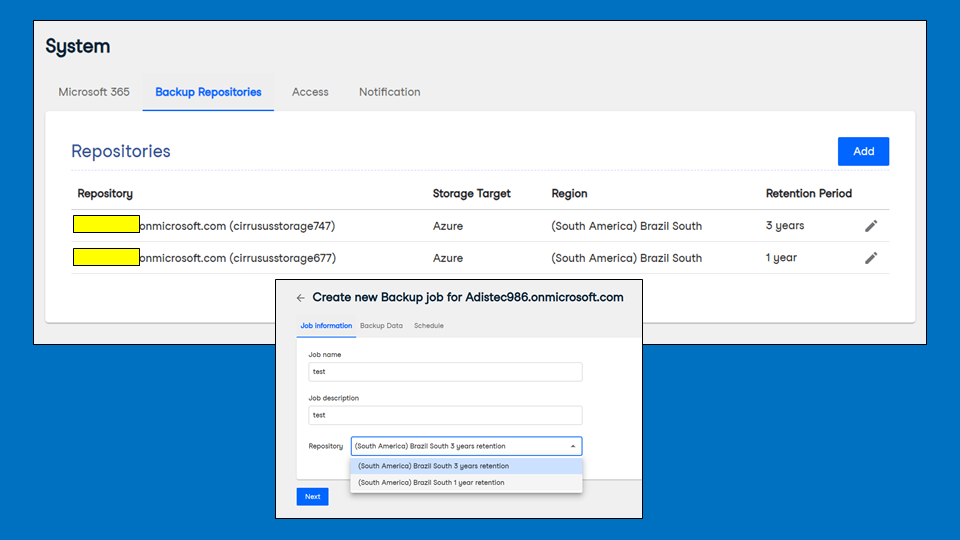
You can create different backup repositories and associate them with varying backup jobs under the “Variable” licensing model.
Each repository can specify different retention periods, ranging from 1 year to 25 years or even “keep it” forever. And at no additional cost! These retention periods are enough to meet most market compliance standards and specifications.
When a user protected by Veeam Data Cloud is removed or deactivated from Microsoft 365, Veeam will still keep backing up these users to Veeam Data Cloud repositories for as long as their retention period is set to keep them. It is fantastic!
No lock-in; the data is yours!
Suppose the customer cancels the Veeam Data Cloud for Microsoft 365 subscription but still wishes to keep their backups accessible and restorable. In that case, they must express their desire to carry out the off-boarding process before canceling.
In this case, the following procedures will then be carried out:
Veeam support takes a snapshot of the storage account we created dedicated to this customer at the time of provisioning.
Veeam can create a new PAYG (Pay as you Go) subscription in Azure and transfer the storage account used by the customer to this new subscription.
Veeam will change the customer’s owner of this new subscription.
Dashboard and Reports
Veeam Data Cloud for Microsoft 365 has a series of reports and dashboards that will keep administrators informed of both performance and activities carried out in the solution.
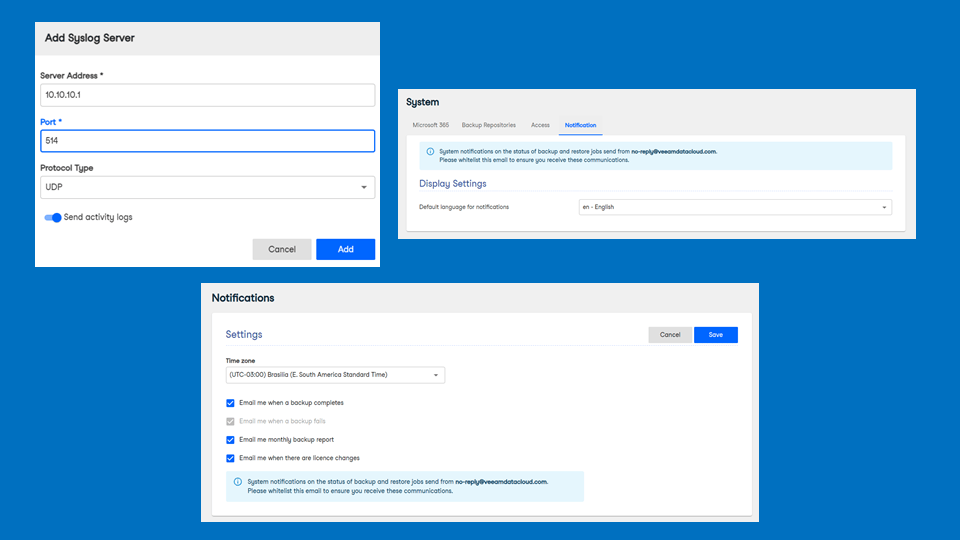
In addition to Reports and Dashboards, there is also the possibility of configuring Notifications so that all this information (whether linked to Job results or activities) is sent to a specific email.
Finally, a last alternative on this topic is if the customer has a Syslog Server (an internal universal log centralizer) and wants the VDC to forward solution activities directly to this internal customer centralizer.
On this administration home screen are some good indicators of the solution’s performance. The backup status indicator will list the results of the last Jobs executed and the daily volume that represents the amount of data stored in the VDC daily.
Next, monitoring the number of protected users and those still without protection is also possible. Another piece of information is the retention applied to the backups. The number of licenses in use, like active protected M365 users and inactive users, for which we have backups that do not consume licenses, the total storage used, and the volumes each user’s backups consume are also displayed.
In the Reports menu, it is possible to export the complete list of protected boxes and users to CSV format.
Note that the Dashboard above licenses have a button to manage licenses. By clicking on it, we will be redirected to the Billing menu within Settings, which creates a baseline of license consumption and provides a dedicated tab for which users consume licenses.
It is worth remembering that any user terminated in Microsoft 365 will have their Veeam Data Cloud license returned to be used by a new user, and even so, the backups of this former user will all continue to be available for restorations and auditing.
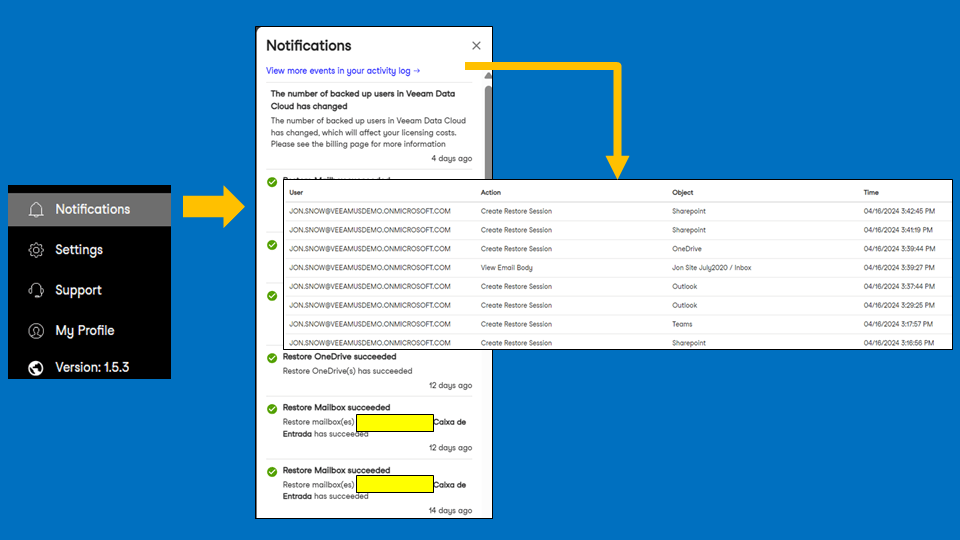
Actions and events are displayed in the Notifications menu, and verifying the activity log screen is possible. All activities carried out in the console will be listed and separated by action, changed object, and date, with the option of filters and exporting as a report.
If the administrator wishes to receive notifications, we can include a client Syslog server or configure notification preferences to receive notifications by email.
Self-Service Onboarding
The onboarding process takes only a few minutes to complete.
I will describe the “Fixed” licensing process. Once you have purchased the service, you will receive a welcome email from Veeam asking you to activate it. Just click on the link presented in the body of the email.
A screen will be displayed for you to log in as an administrator for your Microsoft 365 organization.
You will then have to consent to access your organization’s Veeam Data Cloud for Microsoft 365 service.
You will receive an email from Veeam informing you that your service is active. In the “Fixed” licensing model, a backup job will be automatically created for users in your organization!
From this point on, you will be guided through the service configuration screens. Just follow the steps described in detail in the User Guide:
Hi! The RedHatSummit is taking place between May 7th and 9th. Today Veeam Software launched version 7 of the Kasten, bringing news and improvements related to cyber resilience and enterprise solutions.
One of the most important aspects in application modernization processes is the ability for virtual servers (VMs) and containers (orchestrated by Kubernetes) to co-exist in the same environment. In this sense, one of the main market solutions is the Red Hat OpenShift.
Refer to the following video by Veeam how Kasten enables a best in class data protection solution for users consolidating VM and cloud-native workloads on Red Hat OpenShift on AWS (ROSA) clusters:
Briefly, these are the new features that Kasten v7 will deliver:
Cyber Resilience:
– Availability of Kasten on Iron Bank (secure and hardened image registration), Secure Bill of Materials (SBOM) publishing, and support for FIPS 140-3 enabled OpenShift clusters.
– Expanded protection against Ransomware, with the immutability of backups in Azure Blob, visibility of restore points and integration with Azure Sentinel (SIEM/SOAR).
– Secure authentication, including automatic token generation in Red Hat OpenShift environments and OIDC security improvements.
Enterprise solutions:
– Improved backups of both VMs and “cloud-native” applications, allowing protection for different types of workloads in Kubernetes.
– Improved support for Red Hat OpenShift image streams, container image protection, and space-efficient CephFS snapshots.
Hey! I present the recording of the Veeam User Group Brazil meeting, held on 03/29/24, with the theme “Veeam & Object First, the best ransomware-proof combination”. Mateus Wolf, Elizabeth Souza, Jean Peres, Vitor Koga, Gustavo Dutschmann, and I participated in this session.
Many thanks to Veeam Community and Safiya Mohamed for your support!